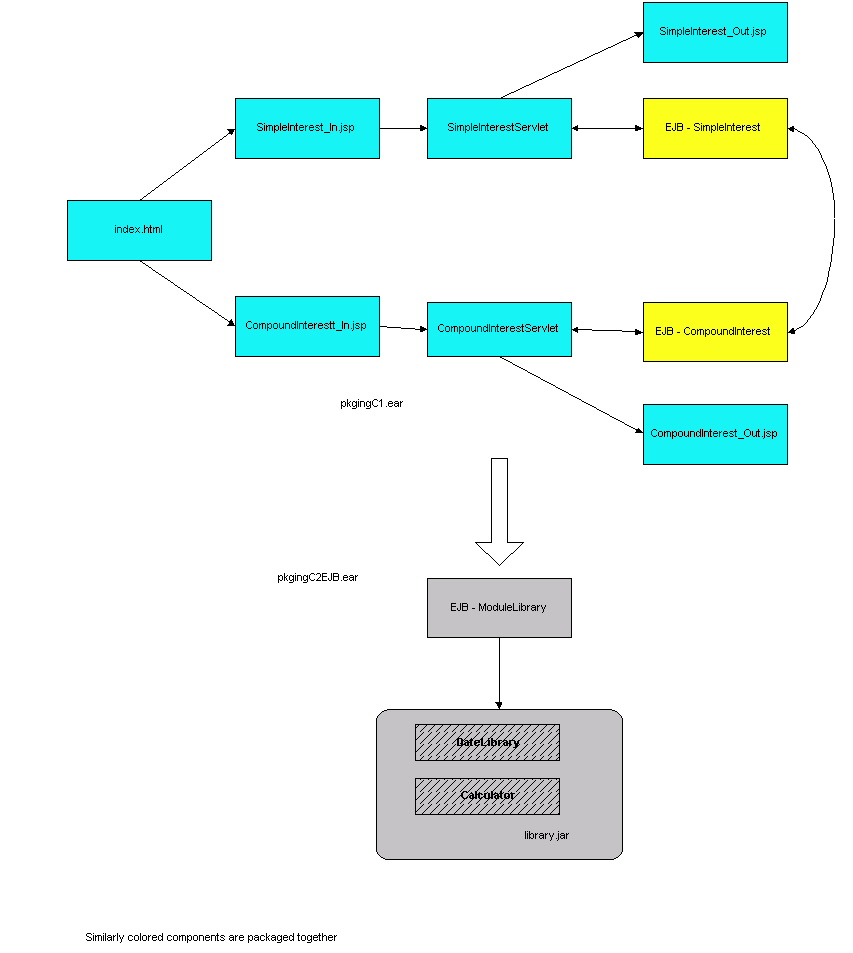
The WAR and EJB JAR modules in pkgingC.ear call business methods of the EJB packaged in pkgingC2EJB.jar. The EJB in turn calls methods in classes packaged in library.jar. This sample demonstrates the following aspects of packaging:
If you already deployed the packaging sample C, you can run the application by clicking here.
This samples illustrates module based registration. A single EAR file (pkgingC.ear) contains one EJB JAR file (pkgingC1EJB.jar) and one WAR file (pkgingCWAR.war). The library files accessed by the components of pkgingC.ear file (for example, DateLibrary and Calculator) are stored in library.jar which is in turn included in the EJB JAR file pkgingC2EJB.jar.
The WAR and EJB JAR modules in pkgingC.ear call business methods of the EJB
packaged in pkgingC2EJB.jar. The EJB in turn calls methods in classes packaged
in library.jar. This sample demonstrates the following aspects of packaging:
Assembling the Application
Go to install_dir/ias/ias-samples/pkging/pkgingC/src. Execute the command 'build'. This command executes the default target that compiles the Java sources, creates the EJB stubs and skeletons and packages the WAR, EJB JAR and the final EAR file. The prebuilt and ready-to-use EAR file under the sample directory can also be used for deployment.
The resulting EAR file can be found at:
install_dir/ias/ias-samples/pkging/pkgingC/assemble/ear/pkgingC.ear
The resulting standalone EJB JAR modules can be found at:
installdir/ias/ias-samples/pkging/pkgingC/assemble/module/pkgingC2EJB.jar
Navigate to the directory containing the application's EAR file and run the iasdeploy command:
iasdeploy deployapp pkgingC.ear
This command deploys the application to the local machine.
Navigate to the directory containing the application's standalone EJB JAR module and run the iasdeploy command:
iasdeploy deploymodule pkgingC2EJB.jar
This command deploys the standalone EJB JAR module to the local machine.
Add the standalone module's directory to the application server's classpath. See the Samples Getting Started Guide for details on setting the classpath to include the following directory:
install_dir/ias/APPS/modules/pkgingC2EJB
Make sure that you restart the application server after the classpath is modified.
Run the application by accessing the following link:
http://<hostname>:<port>/NASApp/pkgingC/index.html
Choose either "Simple Interest" or "Compound Interest". Enter the values on the input form and press "Submit".
If you encounter problems when running the application, review the General Troubleshooting section to learn how to view logs files.Copyright
(c) 2001 Sun Microsystems, Inc. All rights reserved.